Category Archives: Uncategorized

Constructionism and the Maker Movement

Topic 9: Makerspaces
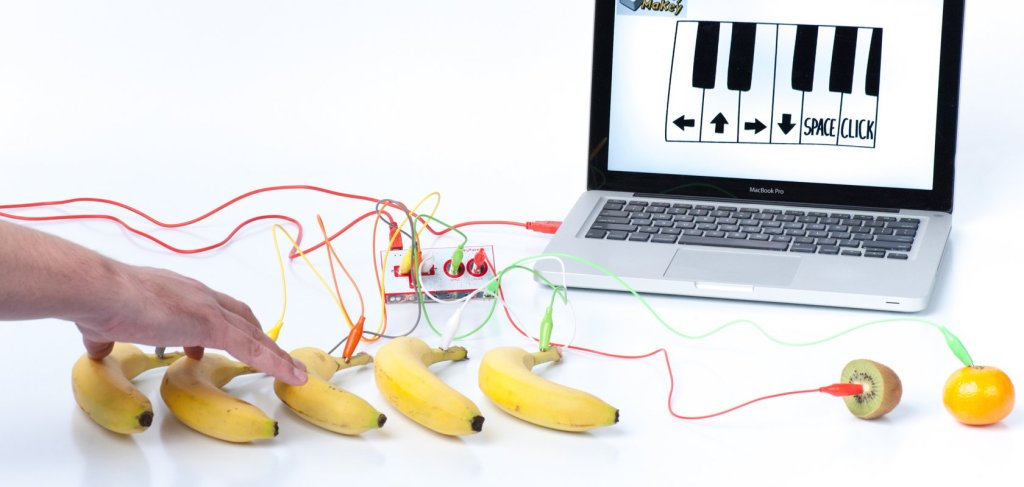
Figure 1: Example of Makey Makey in action. Retrieved from: https://makeymakey.com/

A Makerspace in education, is a zone or a workshop where students are given digital tools and resources to tinker with, in order to support the invention of something new (Welbourn, 2019). Students are given the opportunity to problem solve whilst collaborating with others within a shared space. The digital technologies used within these spaces give students the opportunity to explore multiple STEAM learning areas and facilitates the constructionism theory of learning (Welbourn, 2019). A Makerspace is a hotbed for creativity as students are given the freedom to explore multiple digital tools in a self inquiry based learning environment (Welbourn, 2019). 

Figure 2: Tutorial video of Chibi lights in action. Retrieved from: https://www.youtube.com/watch?v=MpAvCYFR_zM

Makey-Makey is an example of a digital tool that can be utilised within a Makerspace. Makey-Makey is an electrical circuit kit that allows students to explore the concept of conduction and electricity in a non-traditional way (Fokides & Papoutsi, 2020). Students use everyday objects as conductors in order to make a closed circuit that connects to a computer (Fokides & Papoutsi, 2020). This diverse digital tool allows students to explore aspects of science and technology as well as coding concepts (Fokides & Papoutsi, 2020). This emerging technology gives students a different perspective on electricity, further demonstrating how technology can enhance learning and foster creativity. Chibi lights is another example of a digital technology that utilises electrical circuits for learning. Using LED lights and sensor stickers that glow when there is a flow of electricity allows students to see their learning in action (Welbourn, 2019). Finally, another example of a Makerspace technology is BBC Microbit. BBC Microbit facilitates the learning of computer literacy as well as computational thinking and coding (Schmidt, 2016). With computational thinking becoming a widely recognised 21st century skill, Microbit is growing in popularity amongst teaching classrooms (Schmidt, 2016). Designing a make-code that projects a design onto the Microbit coding board is the first step for students in developing computer literacy. 
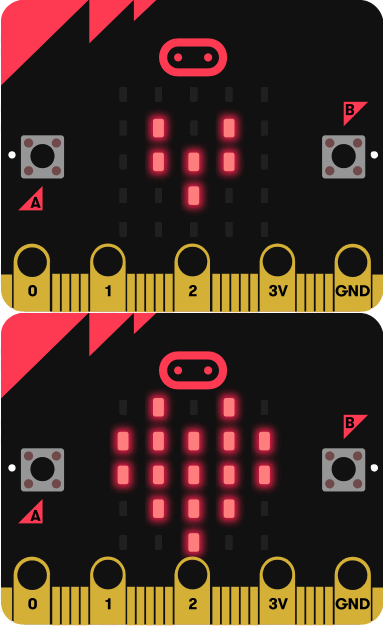
Figure 3: Microbit beating heart code. Retrieved from: https://microbit.org/code/

All of these technologies are examples of digital tools that can be used in a Makerspace. Moreover, implementing these digital tools within classrooms is made easier with the Maker Project Rubric. The rubric allows both teachers and students to recognise the steps needed in order to make a project exemplary. Furthermore, creativity is at the centre of a Makerspace as it facilitates the construction of unique ideas, developed from everyday concepts. 

References:

Fokides, E. & Papoutsi, A. (2020). Using Makey-Makey for teaching electricity to primary school students. A pilot study, Education and Information Technologies, 25, 1193-215.

Schmidt, A. (2016) Increasing Computer Literacy with the BBC micro:bit, IEEE Pervasive Computing, 15(2), 5-7. 

Welbourn, S. (2019). The Making of a Makerspace: A Handbook on Getting Started, Faculty of Education, Brock University, St. Catharines, Ontario, 1-144. 
Digital Games

Topic 8: Kodu Game Lab

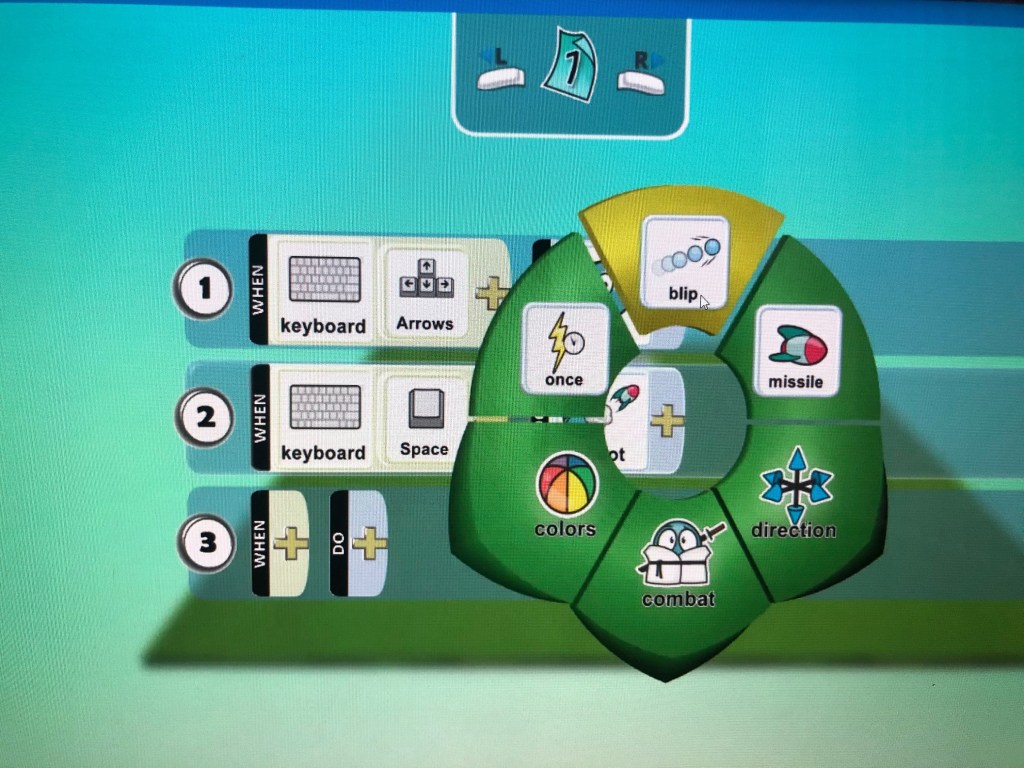
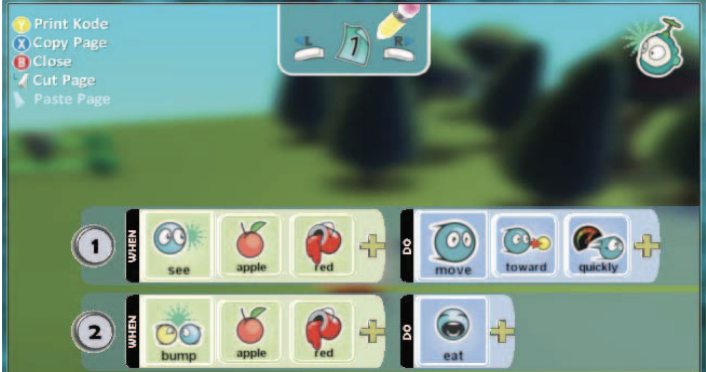
Figure 1: Fowler & Cusack (2011), Programming interface in Kodu.

Digital games provide students with the opportunity to develop their thinking skills in an online, engaging format. Game design has the capacity to promote two pedagogical principles of teaching; constructionism and guided discovery learning (Akcaoglu & Koehler, 2014). Game design also offers students the chance to problem solve in an environment that has many possible solutions, compared to those offered in traditional instructional practices (Akcaoglu & Koehler, 2014). Problem solving is a higher order thinking skill that students need to establish as a cognitive tool before entering the real world. This requires student creativity as well as motivation and engagement to be facilitated in the classroom. Game design has the capacity to offer this to students through authentic, interactive problem solving experiences (Akcaoglu & Koehler, 2014). Moreover, most students struggle with learning the fundamental aspects of computer programming. Games and game design give students the ability to develop those skills in a non-traditional format that is said to make a lasting impact on their development (Fowler & Cusack, 2011). 

Kodu Game Lab is a free game design program offering students isometric 3D playing that has the capacity to motivate and engage students to make their own unique game designs, effectively putting their computer programming skills into practice (Fowler & Cusack, 2011). Compared to other game design programs such as Alice, Scratch and Game Maker, Kodu Game Lab offers students a much more integrated learning experience with more software capabilities allowing for easier accessibility and wider range of use in the classroom (Fowler & Cusack, 2011).

Kodu Game Lab gives students the ability to design their own unique game by introducing their own rules into the program. Students use coding, problem solving skills and in particular creativity when designing and implementing the foundations of a game (Overmars, 2004). Introducing rules into a game world requires students to use their problem solving skills, therefore inspiring creativity (Overmars, 2004). Game design also has the capacity to be integrated into many different KLA’s including mathematics, science and history, making it a flexible and valuable resource in teaching classrooms (Overmars, 2004). 

References:

Akcaoglu, M. & Koehler, M. J. (2014). Cognitive outcomes from the Game-Design and Learning (GDL) after-school program, Computers and Education, 75, 72-81. 

Fowler, A. & Cusack, B. (2011). Kodu Game Lab: Improving the motivation for learning programming concepts, Proceedings of the 6th International Conference on foundations of digital games, 238-240. 

Overmars, M. (2004). Game design in education, Institute of Information and Computing Sciences, 1-7. 

Virtual Reality

Topic 7: CoSpaces

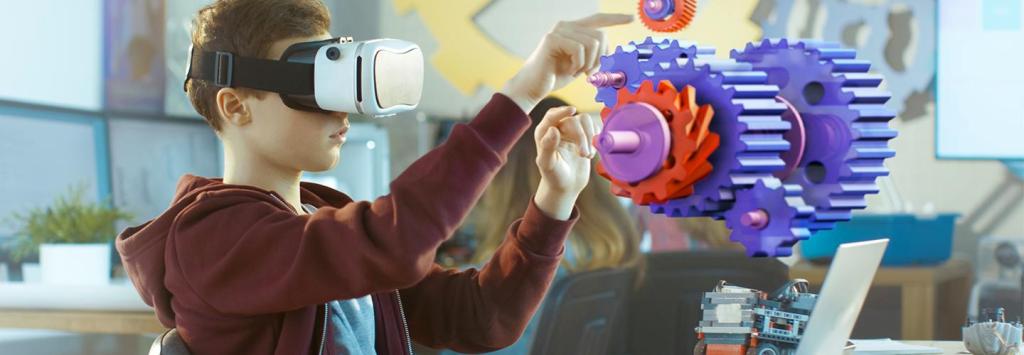
Figure 1: K–12 Teachers Use Virtual and Augmented Reality Platforms to Teach Coding, 2019. Retrieved from: https://edtechmagazine.com/k12/article/2019/02/k-12-teachers-use-virtual-and-augmented-reality-platforms-teach-coding-perfcon

Virtual Reality is an emerging technology that has gained great traction in educational systems (Matteson, 2019). Virtual reality creates an alternate environment that students are able to fully immerse themselves in, compared to augmented reality where students experience reality combined with virtuality (Matteson, 2019). There are multiple pedagogical motivations for virtual reality to be utilised within classrooms. Moreover, its use promotes collaboration among students as well as adopting John Dewey’s constructivist approach to teaching. For example, virtual reality promotes active engagement among students whilst allowing them to flexibly design their own environments based on their prior knowledge and experiences (Kavanagh, Luxton-Reilly, Wuensche & Plimmer, 2017). Experiential and exploratory learning are the foundation for constructivist teaching and can be efficiently facilitated using virtual reality applications (Kavanagh, et al. 2017).

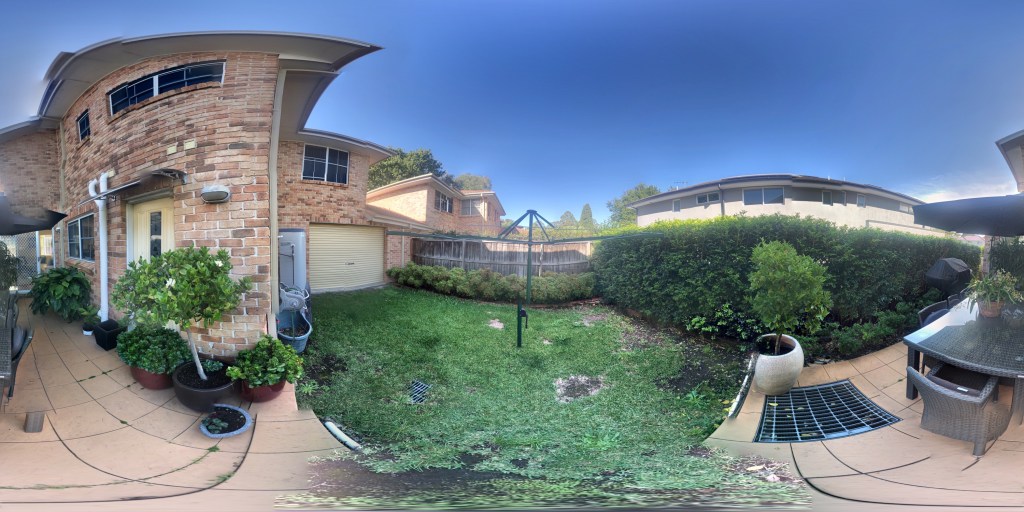
Figure 2: 3D image taken using Google Street View.
Figure 3: CoSpaces virtual world created using Google Street View 3D image.

CoSpaces is a software that facilitates both virtual reality and augmented reality learning. It was created solely to be facilitated in K-12 classrooms for instructional purposes (Matteson, 2019). It enables students to create their own virtual world whilst also incorporating coding blocks that allow students to demonstrate their coding knowledge into objects within their environments (Matteson, 2019). CoSpaces is compatible with a range of 3D applications including Google street view and Google poly (Matteson, 2019). Google street view allows you to take a 3D photo of an environment and then upload it to CoSpaces where it can be turned into a virtual world using the numerous characters and objects provided. On the other hand, Google poly allows you to design a 3D object and then upload it into your virtual CoSpaces world (Matteson, 2019). Both applications have great capacity to be utilised within multiple key learning areas. 

In regards to creativity in the classroom, Yang, Lin, Cheng, Yang, Ren & Huang (2018), state that virtual reality has great potential for fostering creativity as students remain more focused when fully immersed in a virtual environment and show greater capacity for creativity. Compared to augmented reality, virtual reality has the ability to transport students to a different world where they can demonstrate and extend, their creativity and knowledge further (Yang, et al. 2018). Moreover, virtual reality has the ability to facilitate and support creative learning through an immersive and motivating, alternate environment (Yang, et al. 2018). 

References:

Kavanagh, S., Luxton-Reilly, A., Wuensche, G. & Plimmer, B. (2017). A systematic review of Virtual Reality in education, Themes in Science and Technology Education, 10(2), 85,119. 

Matteson, A. (2019). Explore AR/VR with CoSpaces edu, Educators now have a powerful mixed reality platform to share with students, School Library Journal, 65(1), 16. 

Yang, X., Lin, L., Cheng, P., Yang, X., Ren, Y. & Huang, Y. (2018). Examining creativity through a virtual reality support system, Educational Technology Research and Development, 66(5), 1231-1254. 

Augmented Reality

Topic 6: Zapworks

Figure 1: Aj Agrawal, 2018. Retrived from: https://thenextweb.com/contributors/2018/03/23/3-reasons-augmented-reality-will-grow-2018/

Augmented reality (AR) is a form of technology that combines the realism of reality with virtuality, in 3 dimensional space, in real time (Koutromanos, Sofos & Avraamidou, 2015). Augmented reality has multiple capacities for use in education settings through it’s ability to provide students with an authentic and enriched learning experience (Garzon, Pavon & Baldiris, 2019). A literature review conducted by Garzon, Pavon & Baldiris (2019), found that 100% of the research articles they reviewed, reported an increase in academic performance among students when using augmented reality applications as well as a spike in their creative interest. Moreover, due to the rich, interactive nature of AR applications, the retention of knowledge whilst using the applications is an advantage reported by many teachers (Garzon, Pavon & Baldiris, 2019). 

Figure 2: Video of Zapworks creation using http://www.zapworks.com

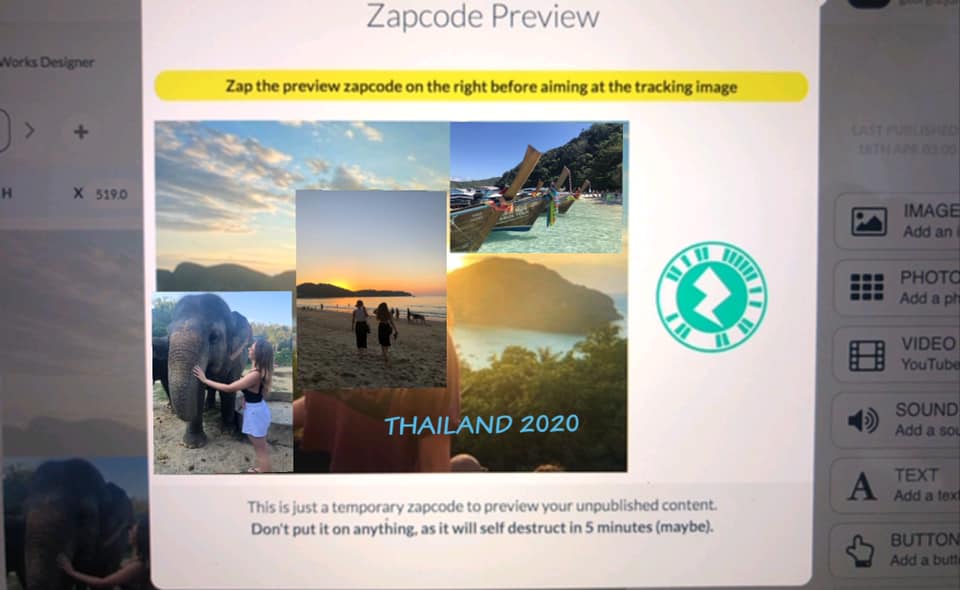
Specifically an AR application that has the capacity to enrich a students learning is Zapworks. Zapworks is a website that can be used to create unique designs that can then be projected into reality using the Zappar application on a smart phone or tablet (Seely, Creasy & Doll, 2019). The technology requires a unique zap code that is linked to the students design. When the zap code is scanned, the design can be seen anywhere in the students reality space (Seely, Creasy & Doll, 2019). When using the application, the Zapworks website at first was hard to navigate. However, once I had fiddled with the options it was easier to navigate and create what I had intended to. I used Zapworks to create a virtual postcard using photos from my trip to Thailand. Once the design was finished, accessing the AR creation was simple. Utilising this type of technology in the classroom has the capacity to foster students creativity as it allows for student work to be enhanced (Koutromanos, Sofos & Avraamidou, 2015). For example, a simple presentation can be turned into an interactive experience using the zapworks design maker. 

Figure 3: Screenshot of Zapcode on http://www.zapworks.com

Moreover, when comparing this technology with ‘Virtual Tee’, used in the EDUC3620 tutorial, there were significant differences in their functioning. Virtual Tee was more information focused, whilst Zapworks is more catered towards fostering student creativity through design. Whilst Virtual Tee is an engaging way for students to learn about specific learning areas, it leaves little room for fostering creativity as the AR has been pre developed. Moreover, the constructivist nature of the Zapworks technology allows students to collaborate with one another and make deep and meaningful connections that have a lasting impact on their education. Furthermore, augmented reality has the capacity to enhance student learning by combining real world knowledge and fostering virtual creativity. 

References:

Garzon, J., Pavon, J. & Baldiris, S. (2019). Systematic review and meta‑analysis of augmented reality in educational settings, Virtual Reality, 23, 447-459. 

Koutromanos, G., Sofos, A. & Avraamidou, L. (2015). The use of augmented reality games in education: a review of the literature, Educational Media International, 52(4), 253-271. 

Seely, B. J., Creasy, A. & Doll, H. (2019). ZapWorks (Augmented Reality) Workshop, 1-3. 

Robotics

Topic 5: BeeBots

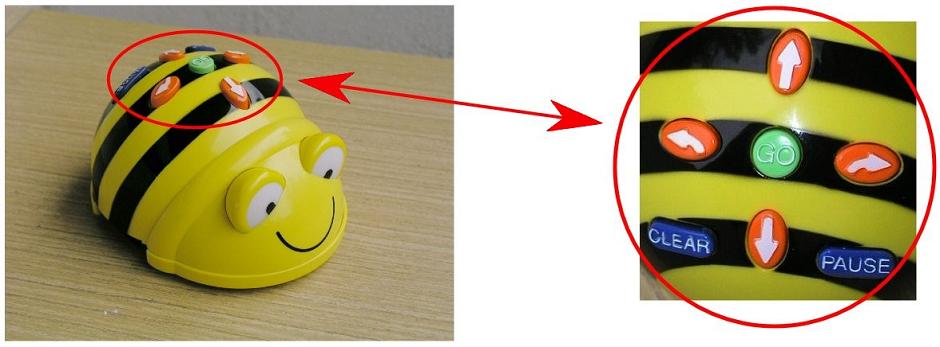
Figure 1: Using Bee Bots in the classroom, 2012. Retrieved from: https://elearningeduc.wordpress.com/2012/04/23/219/

Robotics is a digital technology that allows students to foster their creativity through hands-on problem solving applications (Chalmers, 2018). Robotics allows students to utilise and further develop their computational thinking skills through authentic learning activities (Chalmers, 2018). Beebots are a type of floor robot that can be digitally programmed with 40 steps using 6 different commands (Attard, 2012). It can be utilised in primary classrooms to enhance STEM learning as well as literacy learning and various other KLAs (Hunsaker, 2018). Utilising Beebots in the classroom aligns with the constructivist approach to teaching and holistic learning (Highfield, 2015). 

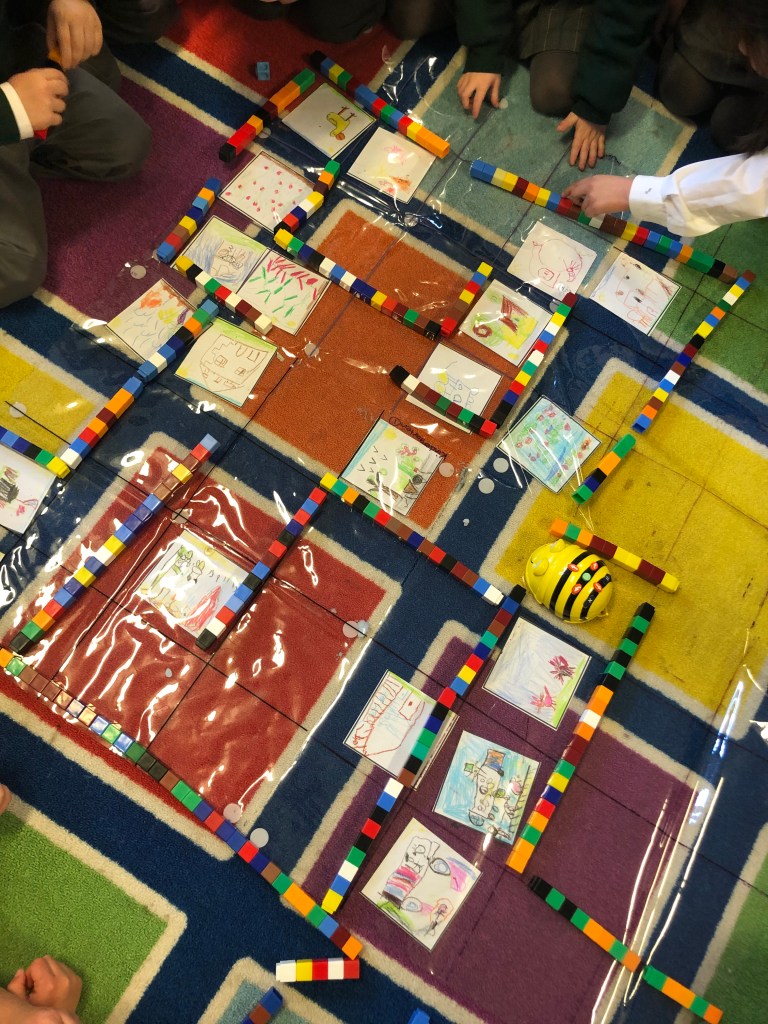
Figure 2: Bee-Bot map created by my prac students

Moreover, the development of 21st century skills is a key learning approach in many curriculums (Highfield, 2015). In particular, Beebots are most effective in promoting collaborative learning, problem solving and creative thinking among students (Hunsaker, 2018). Having a tangible interface for students to experiment with allows their digital learning to become more authentic and engaging, therefore creating a significant effect on students creative thinking (Highfield, 2015). For example, spatial reasoning and position in numeracy can be taught using Beebots. Constructing a maze that students need to navigate their Beebot through requires students to use their decomposition skills and creative thinking (Hunsaker, 2018). They also allow students to collaborate with one another and take on specific roles so they can navigate their Beebot through the maze. The teachers responsibility during these types of activities is to be a support for the students in order for them to reflect on their mistakes, problem solve and experiment on their own (Hunsaker, 2018). These types of activities are made to foster creativity as students are given a number of limitations and left to problem solve their way to a unique solution (Highfield, 2015). Beebots can be used for a variety of teaching opportunities that ultimately foster students creativity and motivate them to explore boundaries.

Figure 3: Lego WeDo 2.0, 2016. Retrieved from: https://robots.ieee.org/robots/legowedo/

A similar technology to Beebots is WeDo 2.0 by Lego. These robotics kits are different from Beebots as they allow the students to build their own robots and program them according to the needs of the assigned task (Chalmers, 2018). WeDo 2.0 is targeted at stage 3 and above whereas Beebots provide flexibility and can be utilised from Kindergarten to year 6 (Chalmers, 2018; Hunsaker, 2018). WeDo 2.0 is beneficial for advancing students robotics skills whilst still keeping them engaged in learning (Chalmers, 2018). WeDo 2.0 fosters creativity as it provides less limitations but requires students to imagine and design their robots before actual construction can begin and software development can commence. Both robots however foster problem solving and creative thinking in different ways and are both positive additions to a classroom teaching program. 

References

Attard, C. (2012). Teaching with technology, Australian Primary Mathematics Classroom, 17(2), 31-32.

Chalmers, C. (2018). Robotics and computational thinking in primary school, International Journal of Child-Computer Interaction, 17, 93-100. 

Highfield, K. (2015). Stepping into STEM with young children: Simple robotics and programming as catalysts for early learning. In C. Donohue (Ed.), Technology and digital media in the early years: Tools for teaching and learning, 150–161, New York, NY: Routledge.

Hunsaker, E. (2018) Bee-Bot: A guide for parents and educators, Department of Instructional Psychology & Technology, 1-15.

Computational Thinking and Coding

Topic 4: Scratch

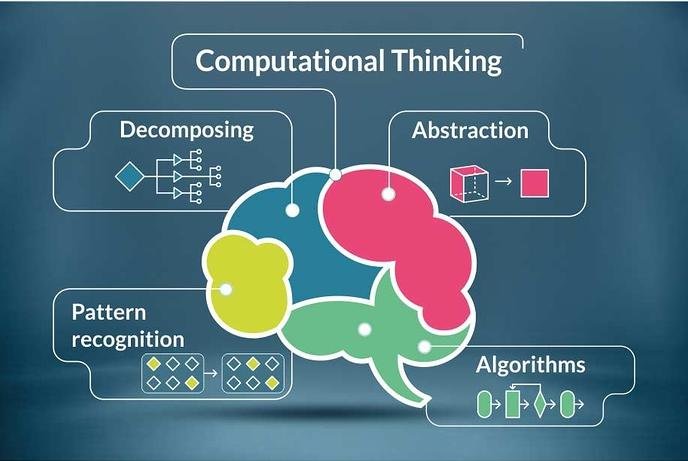
Figure 1: Harimurti, Ekohariadi & Munoto. (2019). The Elements of Computational Thinking. Retrieved from: https://www.researchgate.net/figure/The-elements-of-computational-thinking_fig1_333826796

Information and Computer Technologies (ICT) have become an increasingly important development in modern society (Demir, Caka, Yaman, Islamogu, Kuzu, 2018). Computational thinking, is therefore a skill that needs to be instilled in the next generation in order for technologies to keep advancing (Demir et al., 2018). However, computational thinking is not simply a rote skill or computer programming. It is a human conceptual skill that allows us to problem solve, design and create using abstraction, decomposition, algorithmic thinking and data analysis (Chalmers, 2018). 

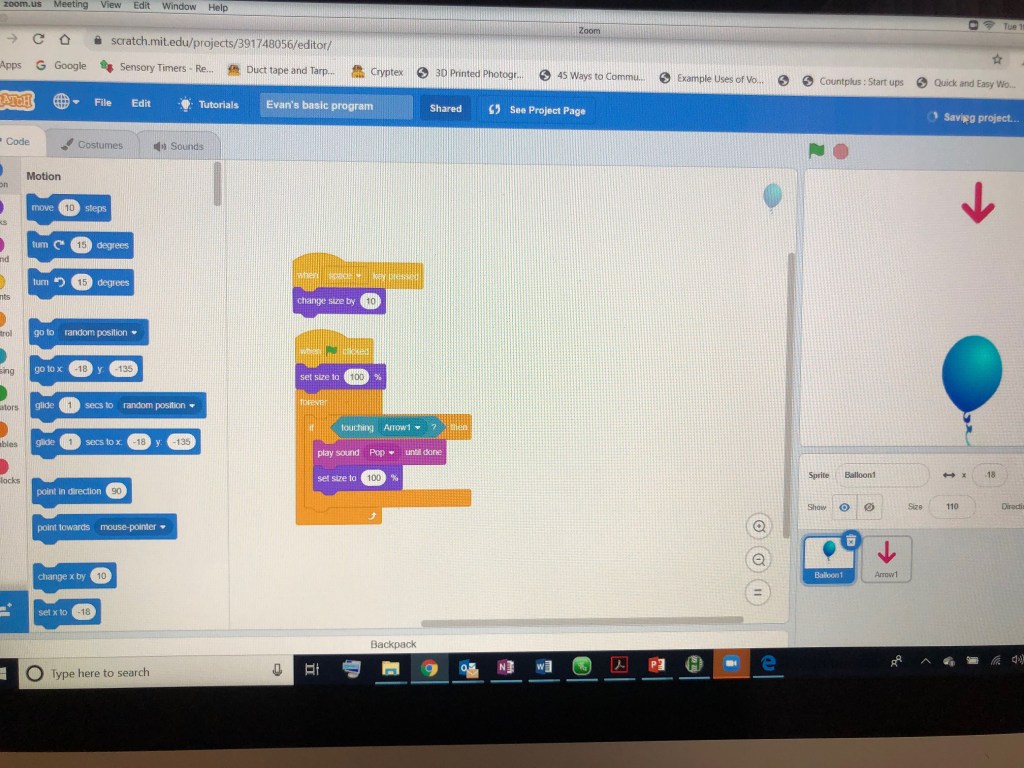
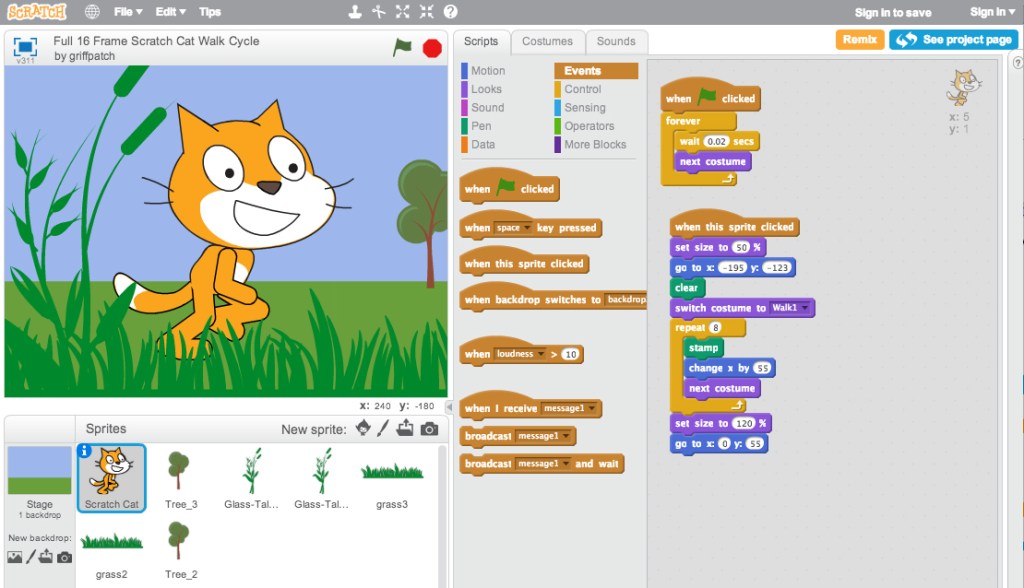
In particular, coding has become a large part of education in recent years and is increasingly used to develop students computational thinking skills (Chalmers, 2018). Scratch, is a programming language created for young people in order to introduce them to the world of coding and allow them to form digital creations (Koh, 2013). It is a building blocks based program that allows students to rearrange commands to create their own scripts, using systematic reasoning and problem solving. (Koh, 2013). This program has the capacity and flexibility to be used in a wide range of key learning areas to foster creativity as well as computational thinking (Koh, 2013).  Scratch is considered a visual block-based programming environment for students to scaffold strategies in learning robotics and coding (Weintrop, Hansen, Harlow & Franklin, 2018). Blockly is a program that also falls into this category. According to Seraj, Katterfeldt, Bub, Autexier & Drechsler (2019), compared to Scratch, Blockly has been shown to intrigue interest in coding among students and in particular among females. Blockly is similar to scratch as it introduces students to the components of coding and robotics using the foundational skills of problem solving and creative thinking in order to find a digital solution (Seraj et al., 2019).

Figure 2: Video taken in EDUC3620 Tutorial 4 Workshop

In terms of pedagogical implications, Scratch is a program that can increase engagement within a classroom if implemented effectively (Grover, Basu, Bienkowski, Eagle, Diana & Stamper, 2017). However, for computational thinking skills to be deeply fostered, students need to be taught how to move from fiddling with the program, to deeply and productively applying computational thinking skills within the program (Grover et al., 2017). Pedagogically, these skills need to be scaffolded using multiple ‘how’ and ‘what’ strategies (Grover et al., 2017). Once students have the capacity to use the program effectively, they are then able to foster deep creative thinking and problem solving within computer technology using their computational thinking (Grover et al., 2017). 

Figure 3: Angela Brown, AACE Review Scratch 3.0. Retrieved from: https://www.aace.org/review/prepare-for-fun-scratch-3-0-is-coming/

References:

Chalmers, C. (2018). Robotics and computational thinking in primary school, International Journal of Child-Computer Interaction, 17, 93-100. 

Demir, K., Caka, C., Yaman, N. D., Islamoglu, H. & Kuzu, A. (2018). Examining the Current Definitions of Computational Thinking. In Teaching Computational Thinking in Primary Education, 36-64. Hershey, PA: IGI Global.

Grover, S., Basu, S., Bienkowski, M., Eagle, M., Diana, N. & Stamper, J. (2017). A Framework for Using Hypothesis-Driven Approaches to Support Data-Driven Learning Analytics in Measuring Computational Thinking in Block-Based Programming Environments, ACM Transactions on Computing Education, 17(3), 1-25. 

Koh, K. (2013). Adolescents’ Information-Creating Behavior Embedded in Digital Media Practice Using Scratch, Journal of the American Society for Information Science and Technology, 64(9),1826–1841.

Seraj, M., Katterfeldt, E. S., Bub, K., Autexier, S. & Drechsler, R. (2019). Scratch and Google Blockly: How Girls’ Programming Skills and Attitudes are Influenced, Proceedings of the 19th Koli Calling International Conference on Computing Education Research, 23, 1-10. 

Weintrop, D., Hansen, A. K., Harlow, D. B. & Franklin, D. (2018). Starting from Scratch: Outcomes of Early Computer Science Learning Experiences and Implications for What Comes Next, International Computing Education Research Conference, 142-150. 

3D Design and Printing

Topic 3: Tinkercad

Figure 1: Industry Week, What’s ahead for 3D printing in 2020. Retrieved from: https://www.industryweek.com/technology-and-iiot/article/21119848/whats-ahead-for-3d-printing-in-2020

Students who learn in self directed, technology based learning environments, are shown to display higher levels of critical thinking and problem solving skills (Kwon, 2017; Trust & Maloy, 2017). Integrating technology into students learning programs is also seen to have higher levels of engagement and enthusiasm in the classroom (Kwon, 2017). 3D printing, is an emerging technology that is slowly being integrated into many K-12 science and technology, engineering, arts and mathematics (STEAM) learning programs (Kwon, 2017).

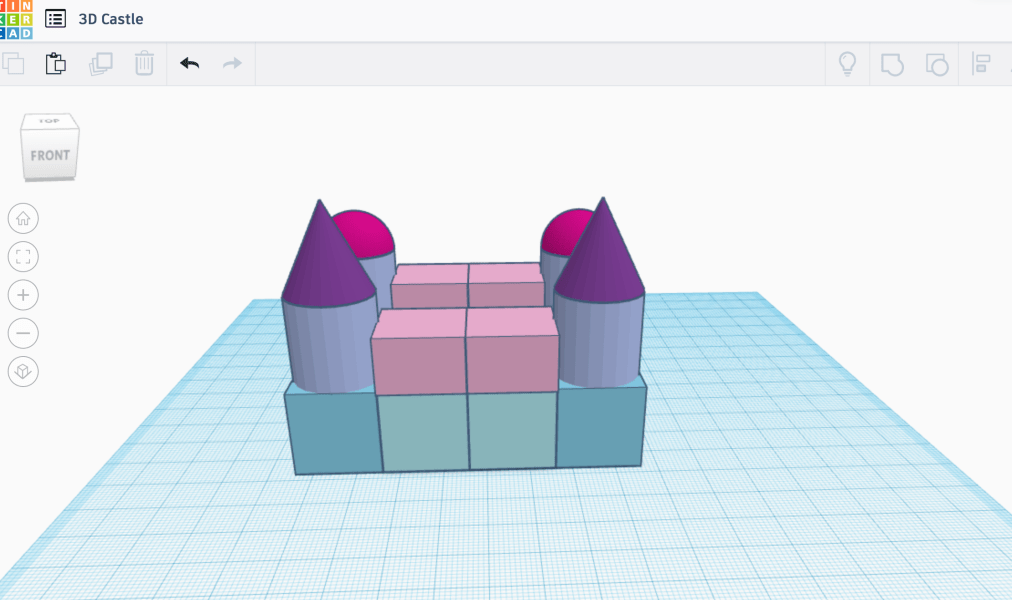
In particular, 3D printing is a design based approach to teaching and learning that requires students to demonstrate and develop their 21st century skills (Trust & Maloy, 2017). 3D printing is the process of printing a 3 dimensional object/figure layer by layer that has been designed using a computer modelling program such as Tinkercad (Ng, 2017). Tinkercad is an online program that allows students to manipulate and adjust their designs through rotating, resizing and measuring (Ng, 2017). For example Ng (2017), studied the benefits of 3D printing in the classroom through observing a year 7 mathematics class. These students were learning volume of solids and were challenged with designing a solid, using Tinkercad, that could be 3D printed and measured. The ability for students to take charge of their own learning allowed them to make meaningful connections as well as develop their design based thinking skills and creativity in a memorable way. 

Figure 2: 3D castle created on Tinkercad

However, there are some negatives that 3D printing poses in the classroom. For example, 3D printing is a time consuming process that has a high likelihood for mistakes and may interrupt active learning time (Trust & Maloy, 2017). 3D printing technology is also an expensive tool that some schools may not have access too. However, as technology is advancing and the benefits for classroom learning are becoming realised, this type of technology is becoming more accessible to schools (Ng, 2017). Moreover, the benefits outweigh the negatives as students are able to witness their designs being brought to life in front of them, allowing their learning to be memorable. 

3D printing can be used as practical based learning that uses a constructivist approach to education through play, problem solving and design and ensures student learning is meaningful and authentic (Trust & Maloy, 2017). 3D printing is an active process that engages students in their STEAM learning and allows them to make real life connections and develop their creative thinking (Trust & Maloy, 2017).

References:

Kwon, H. (2017). Effects of 3D Printing and Design Software on Students’ Overall Performance, Journal of STEM Education, 18(4), 37-42. 

Ng, O. (2017). Exploring the use of 3D Computer-Aided Design and 3D Printing for STEAM Learning in Mathematics, Digital Experiences in Mathematics Education, 3(3), 257-263. 

Trust, T. & Maloy, R. W. (2017). Why 3D Print? The 21st-Century Skills Students Develop While Engaging in 3D Printing Projects, Computers in the Schools, 34(4), 253-266.

Learning Technology Critique

Assessment 1: Emerging Technology

Bloxels: Pixel Press

In today’s classrooms, there is a new demand for innovative technologies that will engage and support student learning. The constructivist theory of education demonstrates a need for students to be actively involved in their own learning and demonstrate their skills through problem solving and creating (Gaeta et al. 2019). In particular, the integration of tangible learning in an educational program is thought to promote a wider engagement with students and develop an understanding of digital and computational technologies (Teck, 2016). 

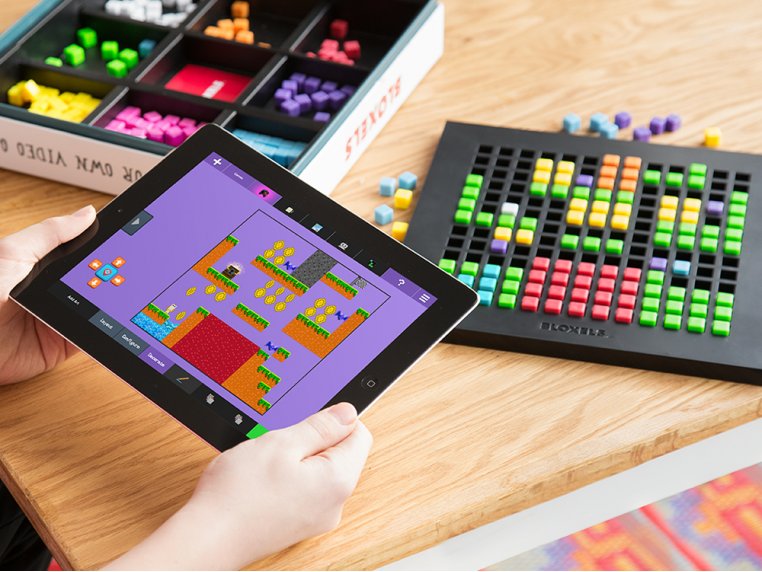
Bloxels, developed by Pixel Press, is an interactive game design application that uses tangible learning to promote education in a diverse range of key learning areas (Teck, 2016). The basis for this application is to aid students in their creativity through allowing them to adjust and test various game models that they have collaboratively designed whilst using problem solving solutions and navigation skills (Teck, 2016). 

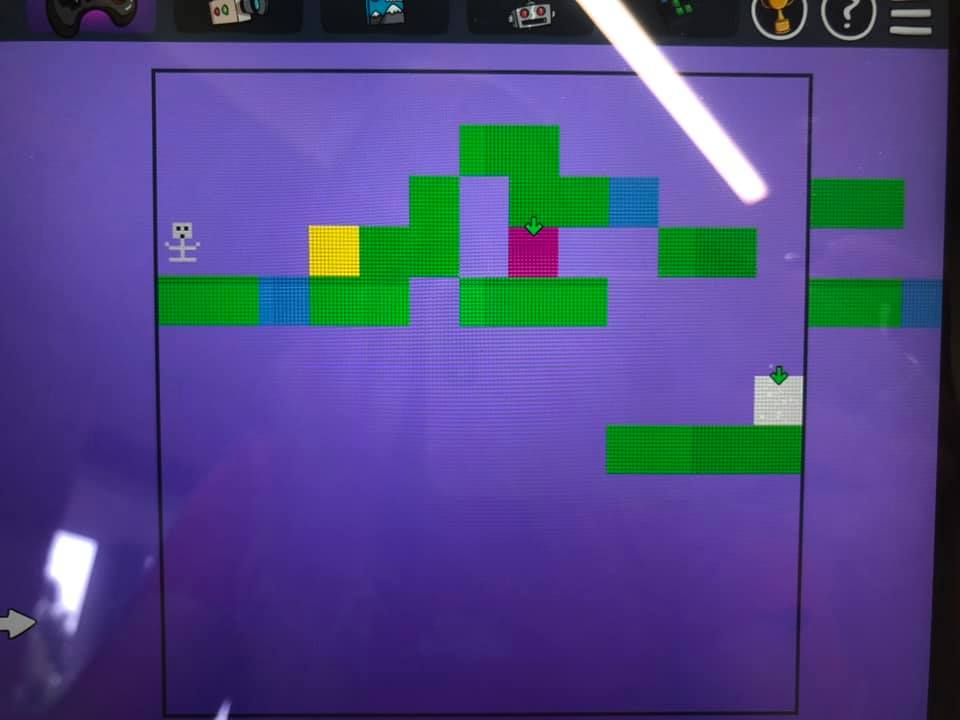
Bloxels is a mobile application that syncs up with a physical game board that students can use to scaffold their game. Each kit provides the user with a game board and 320 coloured blocks with each coloured block programmed for a different operation. There are multiple uses for this app, giving students the freedom to design their game in the form that suits their chosen strategy without needing a coding background (Matteson, 2017). This emerging technology can be used in a variety of key learning areas throughout the curriculum as it has the flexibility to be adjusted according to the needs of the task (Matteson, 2017). 

Video taken in EDUC3620 Tutorial 2 Workshop

However, a criticism for this technology includes limited set up information which may lead to wasted time in the classroom (Matteson, 2017). Information about the application is found online in watchable tutorials. However, this can be seen as a hassle in many classroom situations and requires students to be appropriately informed before they can start benefiting from the technology. 

Promoting creativity is at the core of this technology as students are required to inquire, communicate and problem solve in order to find a solution that has not been explicitly sited to them (Gaeta et al. 2019). Moreover, game based learning is supposed to foster collaboration, support digital technology learning and provide students with an outlet for their creativity (Gaeta et al. 2019). Furthermore, the response from both teachers and students regarding the use of this app in classrooms is positive as students feel more engaged when they are empowered to take control of their own creative learning and teachers are able to facilitate this (Gaeta et al. 2019; Teck, 2016). This emerging technology is recommend for users aged 8 and up and has equal benefit to each age bracket due to its ranging flexibility (Matteson, 2019).

References:

Gaeta, E., Beltrán-Jaunsaras, M. E., Cea, G., Spieler, B., Burton, A., García-Betances, R. I., Cabrera-Umpiérrez, M. F., Brown, D., Boulton, H., Arredondo Waldmeyer, M. T. (2019). Evaluation of the create at school game-based learning-teaching approach, Sensors, 19(15), 1-21. 

The Grommet. (2016). Bloxels – Maker Daniel Wiseman. Retrieved from: https://www.thegrommet.com/our-makers/bloxels

Matteson, A. (2017). Build games with Bloxels, School Library Journal, 63(5), 18-19.

Teck, K. L. (2016). Use of tangible learning in STEM education, SIGGRAPH ASIA Mobile Graphics and Interactive Applications, 23, 1-2.